How to Play ‘Subnautica 2’ in VR, Although You May Want to Wait
- Views: 3

This post was originally published on this site
Subnautica 2 launched into early access yesterday, already having sold over two million copies in the first 12 hours. While it doesn’t include native VR support, that hasn’t stopped the most intrepid of us, who are already swimming around the depths in VR.
It’s no surprise that many Subnautica 2 owners have quite literally already popped their heads into the non-VR game. Like many games built in Unreal Engine, Subnautica 2 can be played in VR already thanks to PrayDog’s UEVR mod suite.
One such user was YouTuber ‘LunchAndVR’, who showed off some of the first footage of playing the game in immersive VR. Here’s the quick, spoiler-free video:
LunchAndVR notes that for now, they’re only able to play in VR with 3DOF and head aiming, which is admittedly less than ideal when it comes to user comfort and immersion, since most VR gamers expect 6DOF and immersive hand controls.
Some pitfalls to avoid include disabling autosave in the game’s accessibility settings, LunchAndVR says, otherwise the game crashes repeatedly. To do that, simply go to Subnautica 2 settings > Debug Settings > Disable Auto Save. At least for now, that means you’ll need to disable VR mode, save whilst in flatscreen, and then re-enable VR.
LunchAndVR also warns that the game isn’t “so good performance wise,” forcing them to lower settings for better stability.
While UEVR isn’t a plug-and-play solution—i.e. you can’t expect perfect results right out of the box—the modding community is currently hard at work generating more immersive mod profiles, which we expect to see in the coming days.
To boot, the Flat2VR modding team even teased a more advanced UEVR profile on the official Discord (invite link), showing Subnautica 2 in action with what appears to be basic motion controls.
Still, as tantalizing as it may seem, you may be better off waiting if you’re hoping to play from start to finish in VR—and that goes beyond the ad hoc VR implementations we’re seeing today.
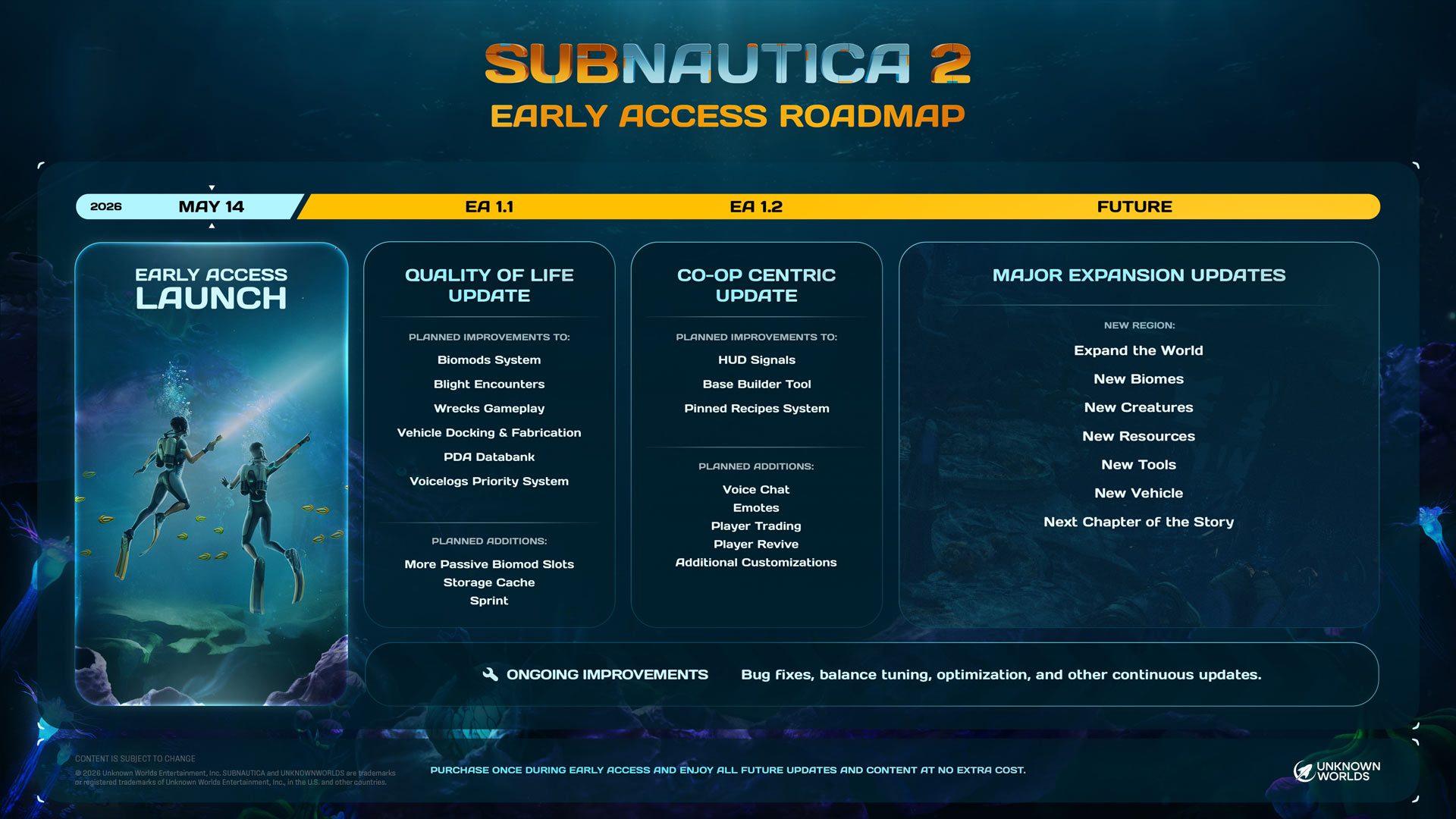
Although the game is impressively polished at this early date, it’s going to be in Early Access over the course of the next two to three years, developer Unknown Worlds says, which means we’re sure to get plenty more content between now and then.
That said, there’s nothing holding you back from doing it right now, or actively contributing to the modding community to make it better for everyone else. Just be warned that updates are likely coming down the pipeline quickly, which could throw UEVR profiles out of whack.
As it is, the studio says official VR support “seems unlikely” and that they’re not currently working on it—something that also seems to be even more clear in the early access roadmap released today.
How to Play Subnautica 2 in VR
From what we’ve heard so far, you’ll need to download the nightly build of UEVR to mess around in Subnautica 2—mess around being the operative words. Of course, you’ll need the PC version of Subnautica 2 as well.
Extract the UEVR.zip to a folder of your choice, then:
- Launch the frontend GUI (UEVRInjector.exe)
- Launch Subnautica 2
- Locate Subnautica 2 in the process dropdown list
- Select your desired runtime (OpenVR/OpenXR)
- Toggle existing VR plugin nullification (if necessary)
- Configure pre-injection settings
- Inject
PrayDog advises that more information and troubleshooting can be found on the Documentation page. In any case, we’ll be keeping our eyes peeled for some of the quick and dirty fixes the modding community will come up with, and add them here.
The post How to Play ‘Subnautica 2’ in VR, Although You May Want to Wait appeared first on Road to VR.
You Might Like