Steam Frame vs. Quest 3 Specs: Better PC Streaming, Power & Hackability
- Views: 2

This post was originally published on this site
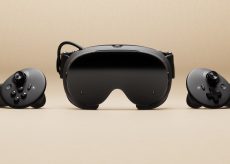
Want to know how Valve’s Steam Frame standalone headset stacks up against the competition? Read on to find out.
Steam Frame is a lot like Steam Deck; it can play pretty much all of Steam’s game library out of the box, which includes flatscreen content based on x86 architecture—basically everything on Steam—and also now PC VR games. That means you can download modern flatscreen and VR titles and play on-the-go, no wires or PC needed. More on that below.
Primarily though, Valve says it’s designed to stream PC VR games wirelessly, which it does through a Wi-Fi 6E dongle you plug straight into your computer (or the newly announced Steam Machine). Our hands-on with Frame’s streaming quality was promising. Our full review is still coming, so check back soon.
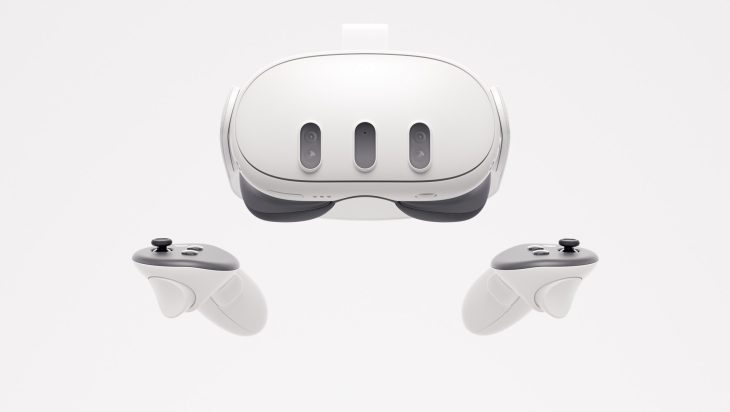
Quest 3 can stream PC VR games too, albeit in a roundabout way that requires you to stream through your home’s Wi-Fi router, which can cause some bottlenecks since the video stream needs to go from your PC, to the router, and then to the headset. Valve’s solution cuts out that middleman.

The big difference though is in power and game compatibility. While both Quest 3 and Frame feature ARM-based Qualcomm Snapdragon processors (Frame’s is more powerful), only Frame can natively play x86 Windows and Linux content thanks to its built-in compatibility layer.
Quest 3 can only natively play games compiled for ARM—albeit from a massive library, all of which are certified to work on the headset. The same can’t be said about Frame just yet.
Valve is distributing Frame dev kits ahead of Frame’s 2026 launch to make sure PC VR studios can optimize; we expect the company to also have some sort of badging system similar to Steam Deck too so users know what works great, okay, or not at all. That said, Valve isn’t stopping you from trying to download and play anything (x86) available on Steam.
Another big difference is the hackability of Frame. The headset natively run SteamOS, although you can technically install any OS on it you want (or realistically can), since it’s an open platform and gives you direct access to Linux for all of your hacking needs. That’s something you definitely can’t do with Quest’s Horizon OS due to its locked bootloader (i.e. no root access).

Valve is so confident in Frame’s SteamOS that the company tells Road to VR the operating system “would be great for other [VR] devices.”
What’s more, Frame also has a user accessible expansion gen4 PCIe port, which supports up to two 2.5 Gbps cameras… or anything you can think of. Additionally, Frame sports an microSD card slot for up to 2TB of additional storage—both of them clear wins for makers and gamers looking to expand Frame out of the box.
Steam Frame could also promise better comfort over Quest 3, although the jury is still out. The headset features a front ‘core’ component, including the displays and optics, which weighs in at only 190g, putting the bulk of the remaining 245g in the total 435g package to the headstrap, which features a rear-mounted battery (21.6 Wh lithium ion). The default config shipped in the box (above) notably lacks a top strap though, which Valve is selling as an optional add-on later to go along with Knuckles-style controller straps (below).

Where things even out somewhat (at least on paper) is the headsets’ displays. Quest 3 serves up a 2,064 × 2,208 per-eye LCD, while Frame has a 2,160 × 2,160 per-eye LCD. Both are clocked up to a refresh rate of 72-120Hz, although Frame is said to allow up to 144Hz in an experimental mode.
Still, Frame does let down in the passthrough department; it only has monochrome passthrough, harkening back to the Quest 2 days—an odd (and probably cost-saving) decision by the company. On the other hand, Quest 3 offers a full-color passthrough, which is undoubtedly the better way to not only checking on your surroundings occasionally while immersed in VR, but also play games on a giant screen in your living room. It’s getting a color passthrough add-on, but it doesn’t come in the box.
It’s undoubtedly early days, but Frame could be a very compelling package over Quest 3. Besides the raw spec sheet (seen below), it’s pretty expensive: 256GB version is priced at $1,059, with the 1TB fetching $1,299.
That’s a hell of a lot better than some people were suggesting though, all of which is in spite of the ongoing global RAM and storage shortage, and incoming Qualcomm chipset price hikes.
In the meantime, you can read our deep dive review of Quest 3 and our hands-on with Steam Frame for more info.
Specs: Steam Frame vs. Quest 3

| Steam Frame | Quest 3 | |
| Base Retail Price | 256GB: $1,059 1TB: $1,299 |
$500 (released in 2023) |
| Weight | 190g core, 435g (core, headstrap, incl. facial interface, audio, rear battery) |
515g (with stock cloth headstrap)
|
| Chipset | Snapdragon Series 8 Gen 3 (SM8650), 8 core CPU ARM processor (4nm) |
Snapdragon XR2 Gen 2, 6 core CPU ARM processor (4nm)
|
| RAM | 16GB Unified LPDDR5 RAM |
8 GB Unified LPDDR5 RAM
|
| Operating System | SteamOS |
Horizon OS (Android based)
|
| Wi-Fi | Wi-Fi 7, 2×2 – Dual 5Ghz/6Ghz streaming for simultaneous VR and Wi-Fi | WiFi 6E |
| Storage | 256GB / 1TB UFS storage options |
528GB / 1TB storage options
|
| Expanded Storage | microSD card slot for extended storage | N/A |
| Optics | Pancake optics | Pancake optics |
| Display | 2,160 × 2,160 LCD (per eye), 72-120Hz refresh rate (144Hz experimental) |
2,064 × 2,208 LCD (per eye), 72-120Hz refresh rate
|
| FOV | up to 110 degrees |
110 degrees horizonal, 96 degrees vertical
|
| Tracking | 4x outward facing monochrome cameras for controller & headset tracking |
4x outward facing monochrome cameras for controller & headset tracking (includes depth sensor)
|
| Dark Environment Tracking | Outward IR illuminator for dark environments | N/A |
| Passthrough | Monochrome camera passthrough (1,280 × 1,024) (color add-on coming) |
Color camera passthrough (1,280 × 960)
|
| Eye-tracking | 2x interior cameras for eye tracking | N/A |
| Rendering enhancements | Foveated Streaming: eye-tracking drives video stream, sending highest resolution to where you’re looking | Fixed Foveated Rendering: continuously renders highest resolution in center of display (no eye-tracking) |
| Other | Wireless Adapter included, Wi-Fi 6E (6Ghz) |
Wireless streaming via Link/Router chain
|
| Audio | Dual speaker drivers (per ear), integrated into headstrap |
Dual speaker drivers (per ear), integrated into headstrap
|
| Mic | Dual microphone array |
At least 3 microphones (unconfirmed)
|
| Port | USB-C | USB-C |
| Expansion Port | User accessible expansion port – ( 2x 2.5Gbps camera interface / gen4 PCIe ) | N/A |
| Battery | 21.6 Wh Li-On Battery |
19.44 Wh Li-On Battery
|
Looking for more Steam Frame news?
Valve Announces Steam Frame Price, Release Date, and Accessories – Pre-orders Now Open: The day is finally here. But will you win the randomized lottery and get a chance to buy the first batch?
Everything You Should Know Before Buying Steam Frame: Everything you might want to know before plonking down your hard-earned cash.
Valve Confirms Half-Life: Alyx is Coming to Steam Frame Standalone, But Not in Time for Launch: Arguably the best VR game is getting a standalone native build for Frame, but you may have to wait.
You Don’t Need a VR-Ready PC (or a PC at all) to Use Steam Frame: Don’t throw your PC in the garbage. You just don’t really need it to use Steam Frame.
Valve is Open to Bringing SteamOS to Third-party VR Headsets: Steam Frame is the first VR headset to run SteamOS, but it may not be the last.
The post Steam Frame vs. Quest 3 Specs: Better PC Streaming, Power & Hackability appeared first on Road to VR.
You Might Like